 Stream
Stop managing tasks. Start executing them
Stream is a task execution app for macOS.
Productivity, simplified and streamlined.
Join the waitlist:
Don't wait, Alpha access will only open to the first 50 users.
The market sold you glorified to-do lists and called them "productivity" apps.
When did a to-do list actually help you get something done?
To get work done, you need workflows that evolve you beyond the list. Beyond braindumping tasks. Beyond the tedious-but-necessary work of prioritizing and organizing them.
Stream automates the task "management", and lets you skip ahead to the part that matters: actually getting **it done.
Here's the flow:
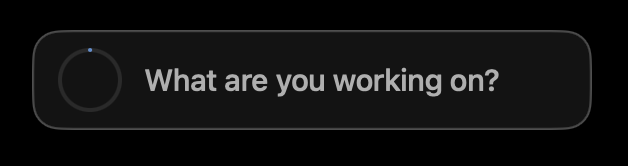
Capture without ceremony
One question. One line. No project picker, no tags to fiddle with. Type what you're doing.
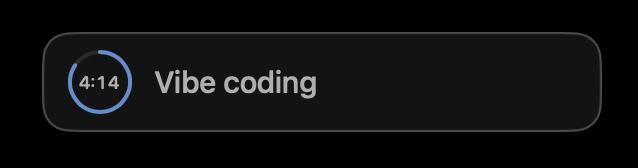
Stay in flow
A quiet ring counts the time you've been on it. Always visible. Never demanding.
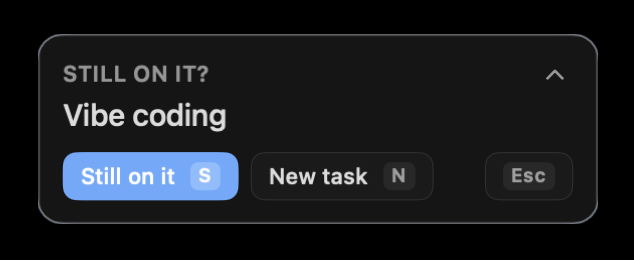
Check in, briefly
On a cadence you choose, Stream asks one question. Then you're back to it.
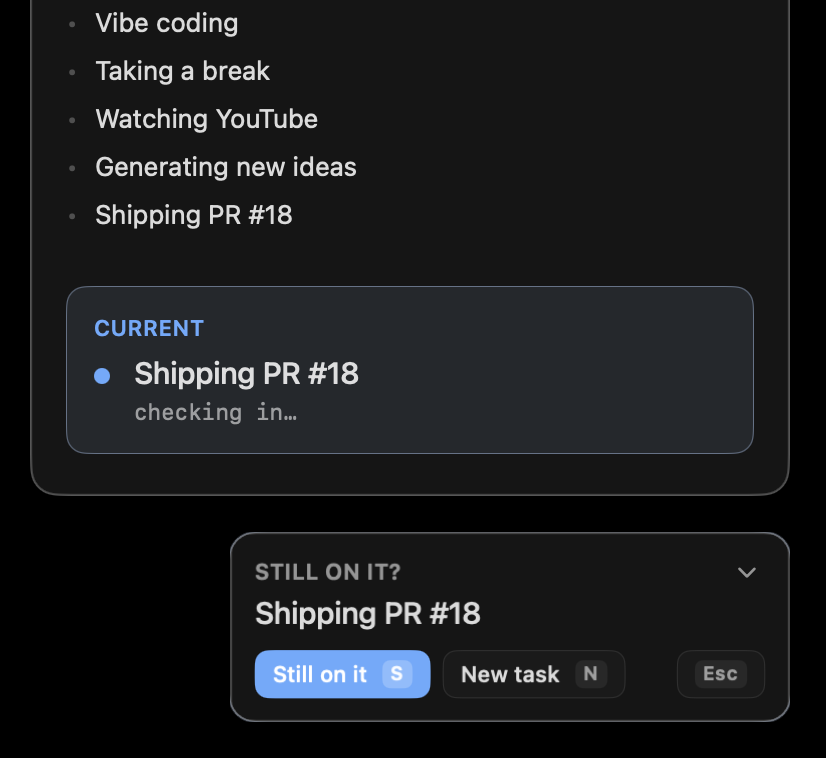
Your day, as a stream
What you finished, what you're on, what's coming. Your day at a glance.
Principles-first. Not feature-first.
We have a few opinions we won't compromise on:
-
01
Execution over administration
Our job isn't to help you make or organize another list. It's to keep you on the next right thing, and out of the weeds.
-
02
Your data, in plain markdown
No proprietary database, everything lives in a folder you choose. Readable in any text editor, and editable by any AI agent.
-
03
AI as a first-class user
Your task files come with a contract AI agents can read, modify, and extend.
-
04
Native feel
Built for macOS. The polish is the product.
Coming soon
The overlay, timer, and interstitial journaling core are wired up and getting polished. Up next: three reimagined workflows (inbox, queue, and waiting), plus calendar-aware flows.
Join the waitlist:
Don't wait, Alpha access will only open to the first 50 users.